Twice v0.8
The Desktop Shell
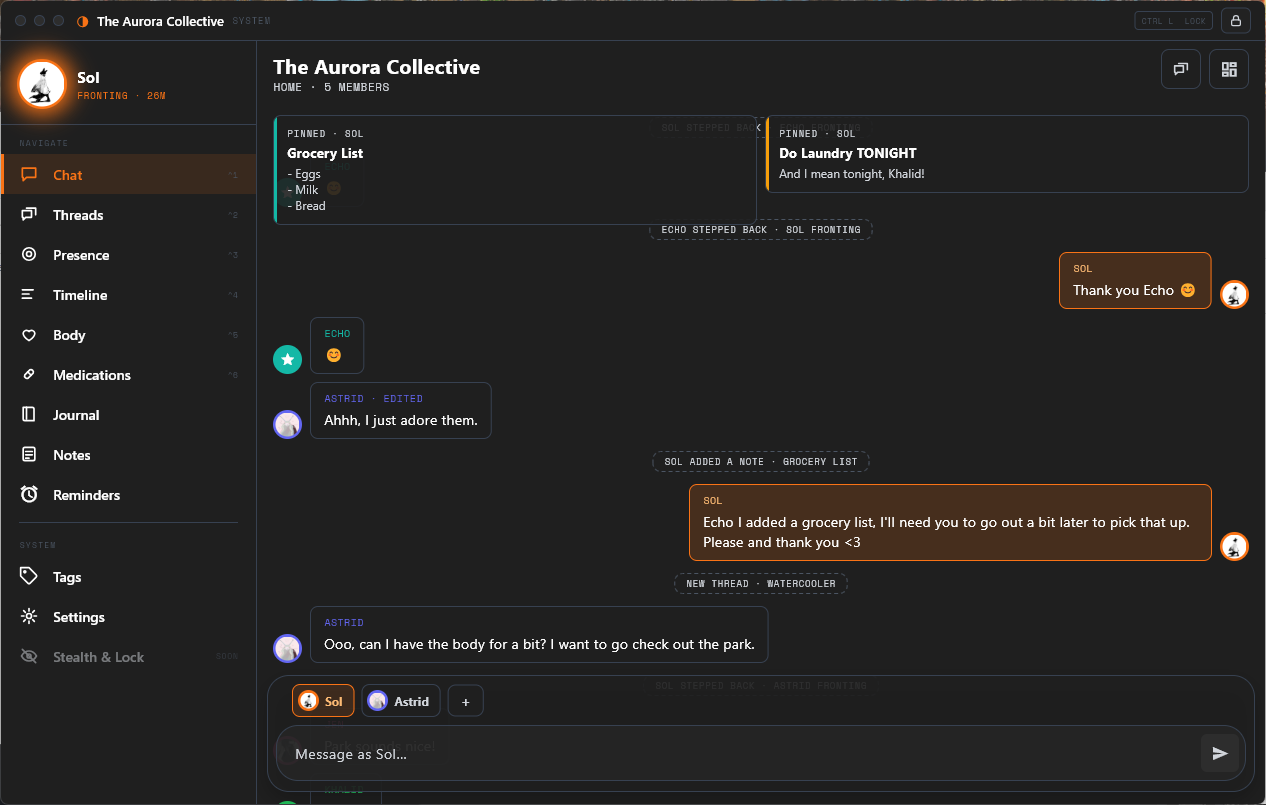
The Presence Field
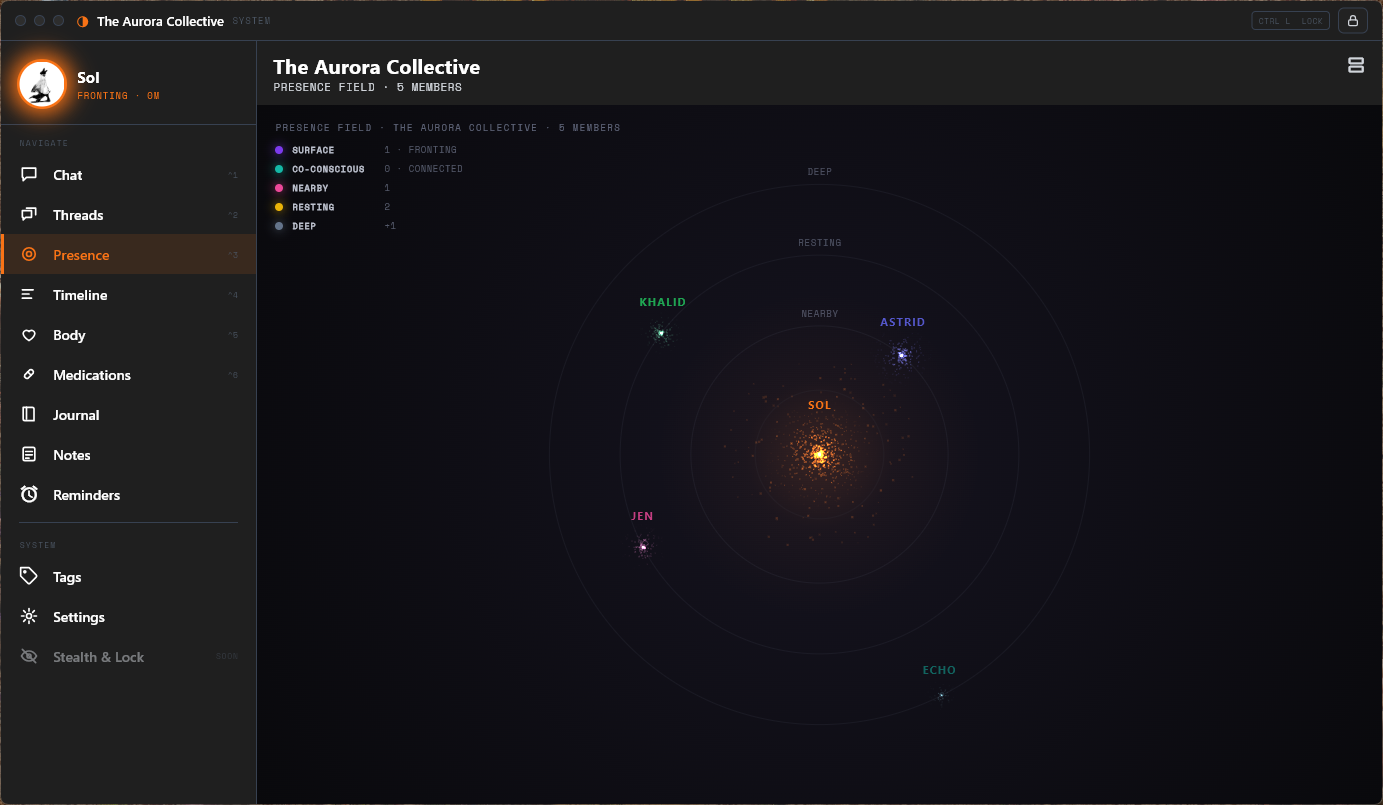
The Journal Canvas
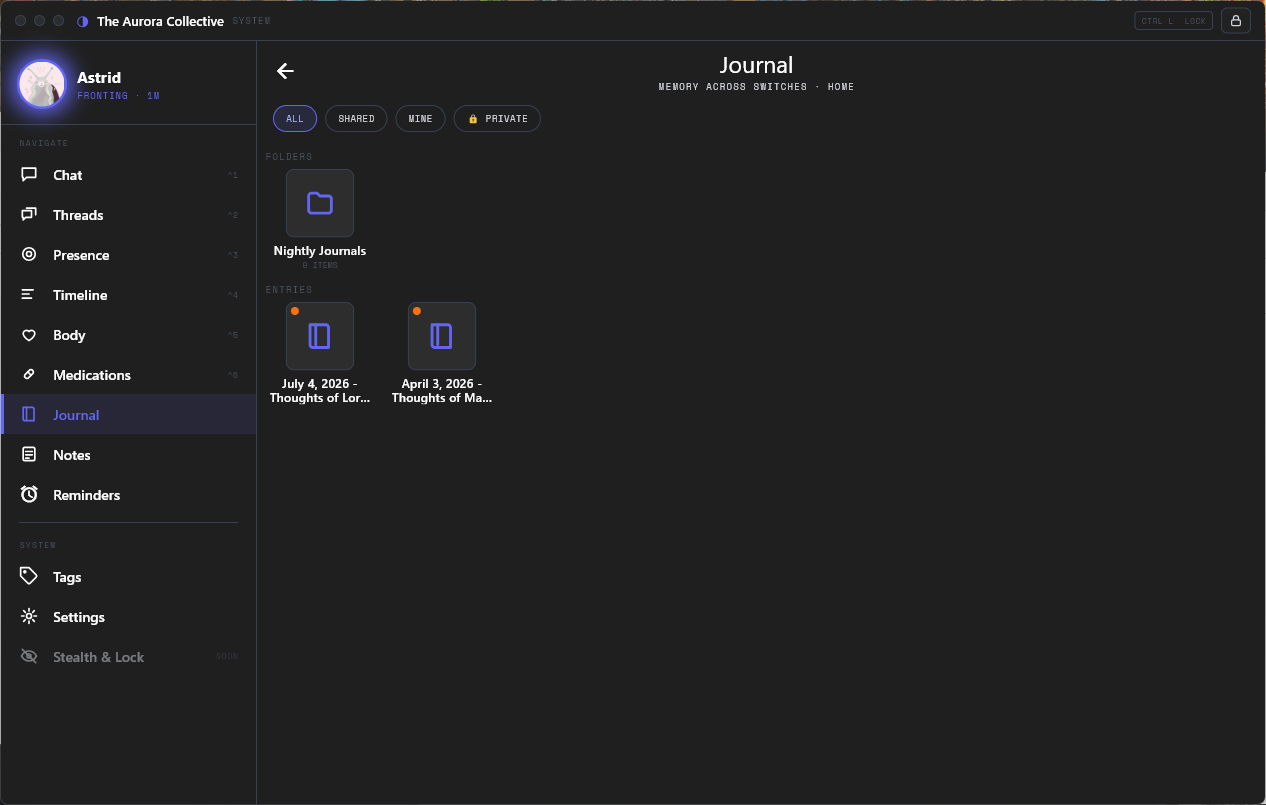
Stats for Nerds:
- Team Size: 1
- Timeline: 4 months (ongoing) - rewrite began June 2026
- Language: Dart
- Framework(s):
- Flutter
- Tools:
- Claude
- Cursor
- Deployment: Android APK + Windows Desktop Build
- Repository:
Privated - Current Build: v0.8 (rewrite in progress)
- Previous Entry: Twice
The Rewrite
Why would you throw away a working app?
If you read the original Twice article, you know the story so far: a React Native app for people with DID / OSDD to manage their system, talk internally, and reach safety tools when it matters most. That app works. It has beta testers. It has a design language I’m proud of.
So naturally, I rewrote the entire thing from scratch.
I’ll be honest about the reasoning. Twice is mobile-first and always will be, but the number of times my testers and I wished we could open our system on a desktop kept climbing. You sit at a PC for eight hours a day; your system doesn’t stop existing because your phone is in the other room.
I looked at the wrapper routes first - Tauri, Wails, things that would let me reuse the React frontend. But the app was already getting a full visual overhaul, mobile was staying the core, and only one option reached Android, iOS, Windows, macOS, and Linux from a single codebase: Flutter.
The math was simple. The redesign was happening anyway, and the app was pre-beta with a handful of users. Rewriting now was the cheapest it would ever be, and it unlocked every screen size I could want at once.
What carried over: the feature surface, the vocabulary, the threat model, and the design language (hard edges, mono labels, the fronting alter’s color threading through everything). What got rebuilt: everything underneath it, plus the single biggest reason this rewrite exists at all.
The Sync
Obsidian Sync, but for your system
The old app was local-only; your system lived on one phone and nowhere else. The new app keeps that local-first heart (the full database lives on every device, everything works offline) and adds end-to-end encrypted, zero-knowledge cloud sync on top.
Zero-knowledge is a specific claim, so here is exactly what it means. Your passphrase never leaves your device. It runs through Argon2id, a deliberately slow key-derivation function, to produce a vault key, and every single object - every message, alter, journal entry - is individually encrypted with AES-256-GCM before it goes anywhere. The server stores encrypted blobs and a sequence number. It cannot read your data. I cannot read your data, and I built the thing.
Your account login and your sync passphrase are two separate secrets; the account is the access gate, the passphrase is the encryption. Compromising one gets you nothing without the other.
And it’s live. Send a message on your phone and your desktop gets a realtime nudge - and even the nudge is just a doorbell, since the notification payload is ciphertext the server can’t parse and the client doesn’t bother reading. The device pulls, decrypts locally, and merges. Type on the phone, watch it appear on the desktop.
Sync runs itself: on app open, a couple seconds after you change something, on a background poll, and instantly through realtime. There is no sync button anxiety. The bar I set for it was “behave like Obsidian Sync”, and it does.
The Big Three
Chat, Presence, and Journal
Three surfaces carry this app, and each one got real work in the rewrite rather than a straight port. This is where most of v0.8 actually lives.
The Chat
Still a group chat with yourself
The chat is home; it’s the first screen you land on after the lock. The core idea from v0.6 is unchanged, and I’d still call it the soul of the app: one ongoing room, always seen from the perspective of whoever is fronting, and when a swap happens the entire view shifts to the new perspective.
The rewrite grew it into a proper hub. A docked bar at the top shows today’s fronting timeline as colored segments, so you get a read on the day at a glance without leaving the conversation. Fronting handoffs and blurry stretches appear inline in the message flow as system events, right where they happened. A row of speaker chips above the composer shows who’s fronting and co-conscious, and speaking as someone else is one tap - speaking is deliberately separate from fronting, because sometimes someone has one thing to say and taking the wheel for it would be overkill.
The Chat
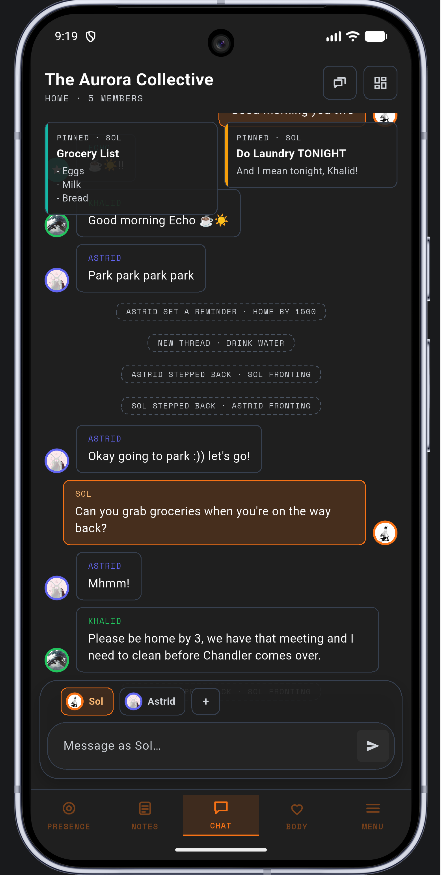
The Chat, from another perspective
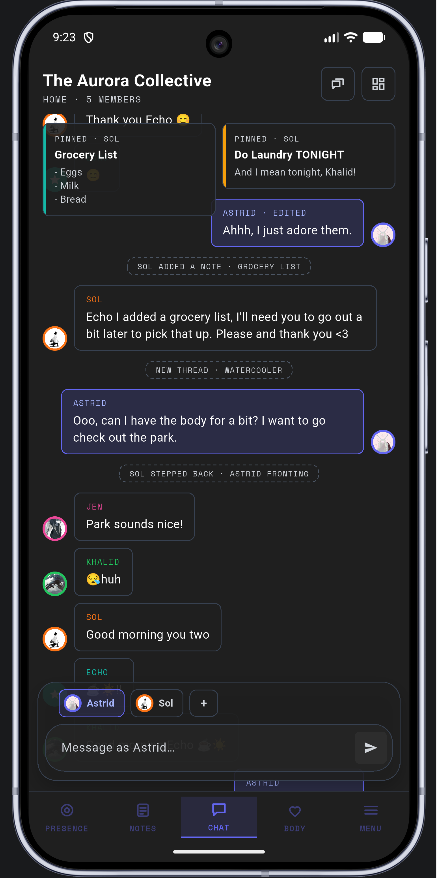
Threads branched off the main room in this version too: shared or private side-rooms for conversations that deserve their own space. Private means visible only to the owner while they front, with one deliberate exception I’ll get to in the journal section. And any message can now be pinned to the shared strip alongside notes and threads, which the old app never had.
On desktop, chat becomes a master-detail spread: rooms on the left, the open room beside them, Enter to send, Shift+Enter for a newline. And because of the sync layer, the open room refreshes live while you’re looking at it; messages sent from your phone just show up.
The Presence Field
Your system as a small galaxy
The system web from v0.6 was a static bubble chart. Its replacement is my favorite thing I have ever built.
The presence field renders every alter as a swarm of luminous particles, and distance from the center encodes presence: fronting at the core, then co-conscious, nearby, resting, and a deep rim at the edge. The fronter and any co-conscious alters orbit a shared center of mass, their clouds blending together. Color saturation fades as an alter sits deeper and comes back as they rise. More present means denser and brighter; when an alter moves, their swarm visibly sheds particles or draws in more to match the new depth.
The Presence Field
The particles have actual physics - velocity, momentum, damping - so they’re pulled toward their orbits rather than teleported. Swarms drift over time, and the field remembers where each one drifted to; come back later and everyone is where they wandered.
Changing presence is physical. You drag a swarm, and as you drag, the ring under your cursor lights up and names itself - FRONT, CO-CON, NEARBY, RESTING, DEEP - so you always know what letting go will mean. Drop an alter at the center and it’s a fronting handoff: the new fronter flows into the core and the old fronter flows outward through them. Clicking a swarm opens a smoked-glass panel tinted to that alter’s color, with their bio and quick actions.
The Presence Field, on mobile
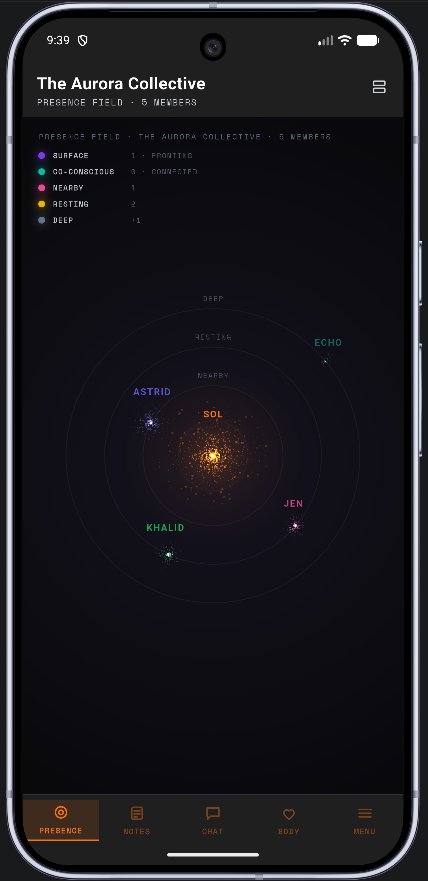
One design constraint mattered more than any of the visuals: heavy motion can be activating for exactly the people this app is for. Reduce-motion is honored as a first-class setting (the field settles to a still frame), and the calmer banded layout from the original design stays available, with the particle field as a view you choose.
The Journal
A tiny Obsidian inside the app
The journal got the biggest single overhaul of the rewrite. It went from a flat list of entries to a spatial canvas.
Entries and folders are icons in a space, like a desktop. Hold your thumb on empty space (or right-click, on desktop) and a menu spawns right under it: add an entry, add a folder. The same gesture on an item gives you open, edit, info, delete. You drag things around to arrange them, drop entries into folders, nest folders inside folders, and give anything a custom icon or emoji. There’s no floating action button and no compose form; hold, add, and you’re writing.
The Journal Canvas
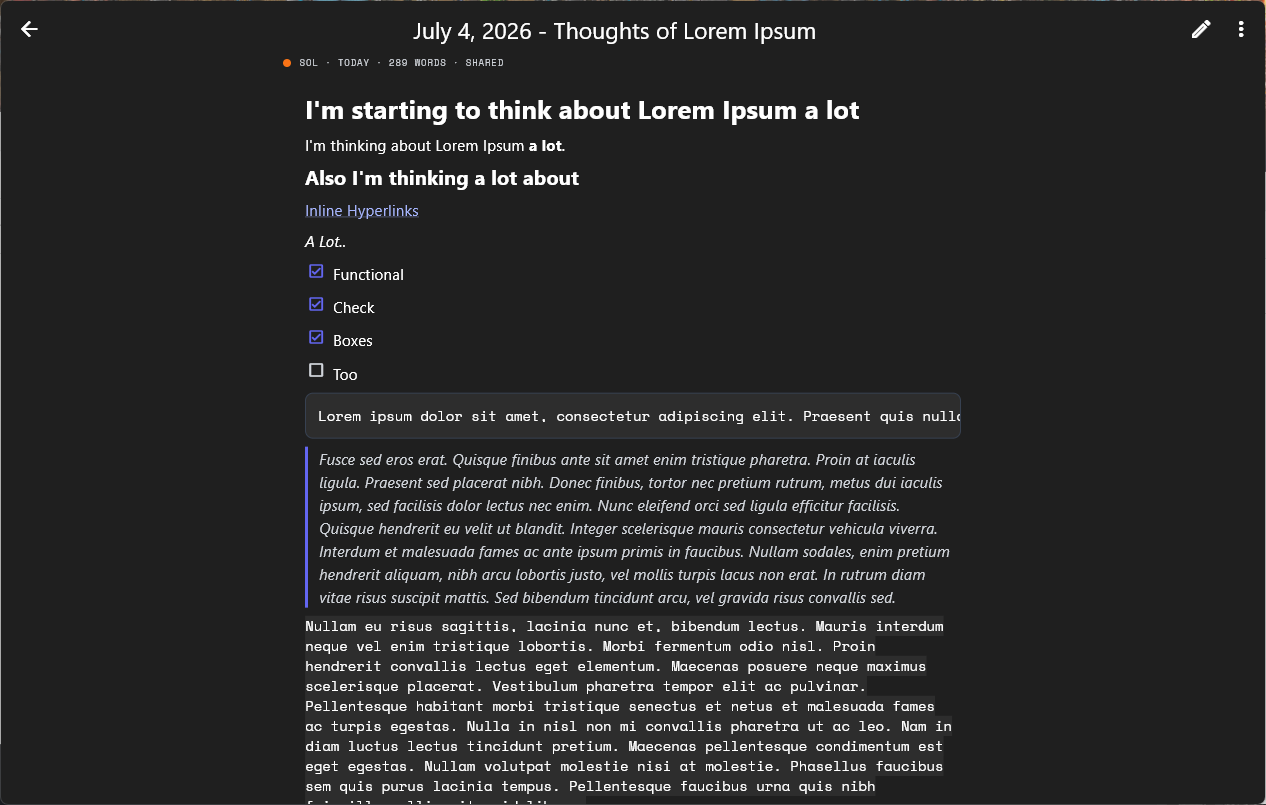
The writing surface mimics Obsidian, because I live in Obsidian. Reading mode renders your markdown; editing mode shows the raw source with live syntax highlighting.
Reading Mode
Source Mode
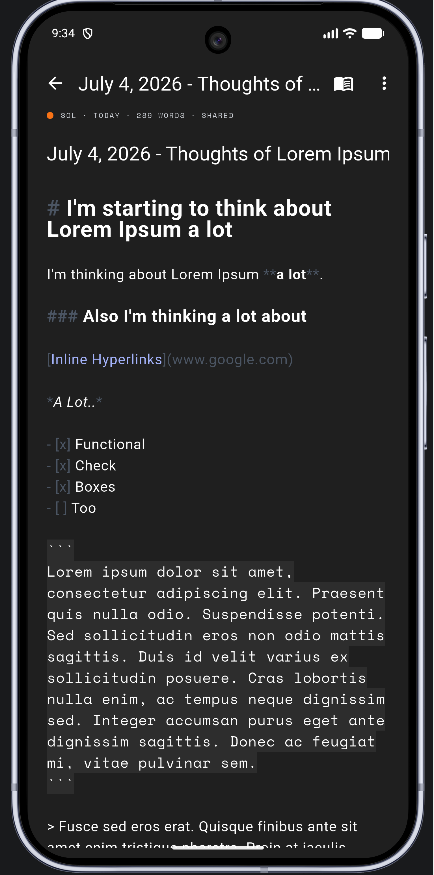
On mobile, a formatting toolbar sits directly above the keyboard. On desktop you get a centered writing column, a file tree beside it, and formatting on right-click.
Writing on Mobile
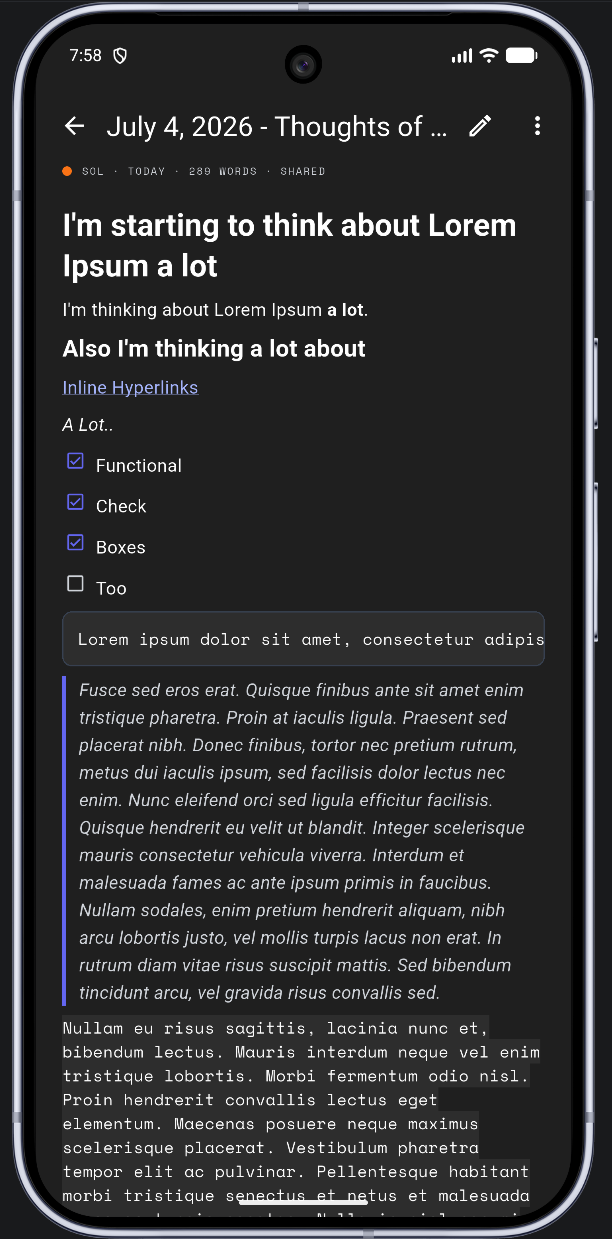
The metadata is where the journal stops being a note app and remembers who it’s for. Every entry carries its author alter, an emotion of the day, the day’s triggers, a description, and a written-on date you can adjust yourself - because journaling across memory gaps sometimes means writing today about a day someone else lived, and backdating an entry is a legitimate, first-class thing to do here.
Privacy carries through. Entries are shared, mine, or private; someone else’s private entry shows on the canvas as a locked icon rather than vanishing. You can see that it exists, who wrote it, and when - the emotion, description, and body stay sealed. Nobody feels erased, and nothing leaks.
Which brings me to the exception I promised: the break-glass unlock. Re-authenticate deliberately and every private entry and thread opens for the session, with a persistent banner reminding you the door is open until the app locks again. If you’re sitting in therapy and need to reach a journal that isn’t “yours,” you can - on purpose, never by accident.
The Desktop
The same brain, a bigger canvas
The desktop app is not the phone app stretched wide. Below a width breakpoint you get the phone shell, bottom bar and drawer and all. Above it, the app swaps into a proper desktop shell: a frameless window with a custom title bar, a persistent sidebar that collapses into an icon rail at middling widths, and keyboard shortcuts (Ctrl+1-6 to jump surfaces, right-click standing in for long-press everywhere).
Single-column tunnels on the phone become spreads on desktop: chat and journal get the side-by-side layouts above, the timeline pairs the day’s chart with an editing pane, threads go full three-pane. The safety surfaces deliberately do not - the lock screen and the grounding overlay stay single, full-bleed gates on every device. A gate should be a gate.
Desktop Chat
The Rest of the House
Everything else made the trip too
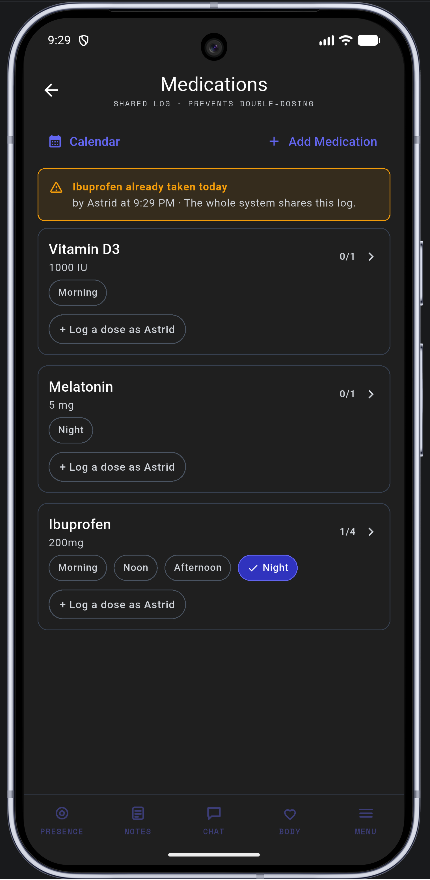
Everything from the original article survived the rewrite: the board and reminders, the timeline and its per-alter breakdowns, medications and the body screen, the lock, per-alter theming, dark and light. Two changes are worth calling out.
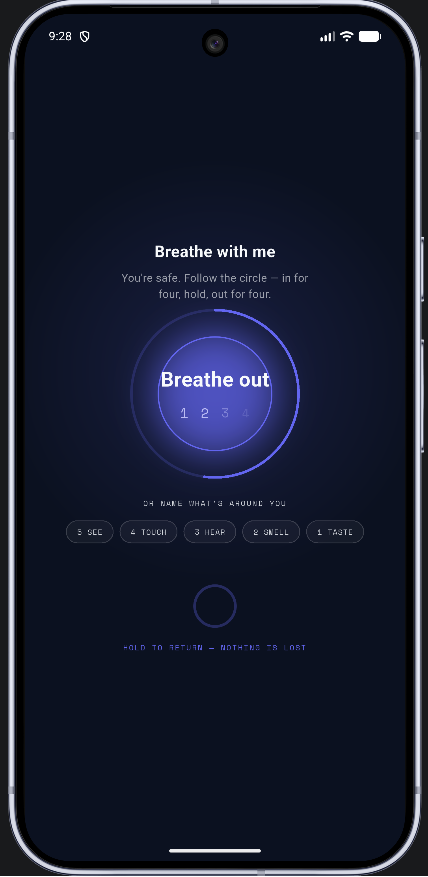
Grounding got gentler. The breathing guide moved from four-phase box breathing to a three-phase cycle: in, hold, out. The empty-lung hold in box breathing can trigger air-hunger when you’re already panicking, which is precisely the moment that screen exists for. Small change, chosen carefully.
And the whole app finally speaks one design language. The v0.7 redesign was a reskin laid over an older skeleton; in the rewrite, every screen was born into it.
The Grounding Screen
Medications
The Engineering
For the nerds who scrolled this far
The Stack
Coming from React Native, every piece had a Flutter analog waiting: Zustand became Riverpod, Drizzle became drift (still SQLite underneath), Expo Router became go_router, Reanimated became plain AnimationControllers. The mental model transferred almost one-to-one; the syntax did not.
The app currently sits at roughly 80,000 lines of Dart with over 850 tests, and every change lands under the same gate: static analysis clean and the full suite green, or the work isn’t done. No exceptions, and no “I’ll fix it later.”
The Sync Engine
This is the part I’d frame and hang on a wall.
The app code does not know sync exists. SQL triggers mirror every local write into an outbox table automatically; no repository, store, or screen carries a line of sync code. A sync pass is two moves: push drains the outbox (encrypt each changed object, send it up), and pull asks the server for everything after the device’s cursor (decrypt, merge with last-writer-wins, advance the cursor). The server assigns the sequence numbers itself, so cursors don’t care what any device’s clock thinks the time is.
The encryption is address-bound, too. Each blob’s authentication data includes which system, collection, and object it belongs to, so a valid ciphertext can’t be copied into a different slot and still decrypt.
Realtime sits on top as pure latency. The server broadcasts “something changed” to your other devices, the payload gets ignored (it’s ciphertext anyway), and the device runs a normal pull. If realtime drops an event, nothing is lost; the next cursor pull self-heals. Between the doorbell, a short debounce after local writes, a periodic safety poll, and a pull on every app open, the engine is boring and deterministic, which is exactly what you want from the thing holding your system’s memory.
My favorite bug of the build lived here. The “push shortly after a local edit” watcher was pointed at the outbox table - but the outbox is written by SQL triggers, and the database layer only fires change notifications for writes made through its own API. The watcher never fired once; only the safety poll ever pushed anything. The fix was watching the tables the app actually writes to instead. It’s the kind of bug that only surfaces when you test on two real devices sitting next to each other.
The Desktop Shell
The router doesn’t know desktop exists, either. The active screen is built once, above a breakpoint switch: under 600 pixels of width it gets wrapped in the phone shell, over it, the desktop shell. Because the screen lives above the switch, resizing across the boundary doesn’t lose your place - and the phone experience is exactly the code that already existed, untouched. Desktop was added without a single mobile regression.
What the Gate Catches
A test discipline is only worth bragging about if it catches real things, so here are some things it caught:
- A race where backing out of one chat room and quickly opening another could paint the first room’s messages over the second, if the first database read resolved late.
- A hover highlight that rendered fully opaque, because an alpha value meant for a 0-255 scale was handed to a 0-to-1 API. 85 out of 1.0 clamps to… yes.
- Rapid fronting swaps could each leave the previous session open, quietly corrupting an alter’s fronting-time stats. The fix was structural rather than a patch: swaps update the UI instantly, but the database commit waits behind a short debounce and then reconciles from a fresh read, so exactly one open session per role can ever exist. Settle your indecision first, then write it down once.
And one it didn’t catch, which taught me more than the ones it did. The desktop sidebar crashed on first real launch with an error the entire suite had missed, because the test harness helpfully wrapped every widget in scaffolding the real app didn’t provide. The tests now pump the shell bare, exactly as production builds it. If your harness is more forgiving than your app, it’s testing a different app.
The Road to v1
This article is versioned like the app, and this is the v0.8 edition. It will grow alongside the rewrite, with the v1 edition landing with the release proper.
The promise from the first article hasn’t moved: no paywalls, no ads, ever. Built for the DID / OSDD community, by the DID / OSDD community - now on every screen you own.
Article changelog: v0.8 (July 2026) - first edition, covering the Flutter rewrite, encrypted sync, the chat / presence / journal rebuilds, and the desktop shell.